This is the product. Use these two pictures.
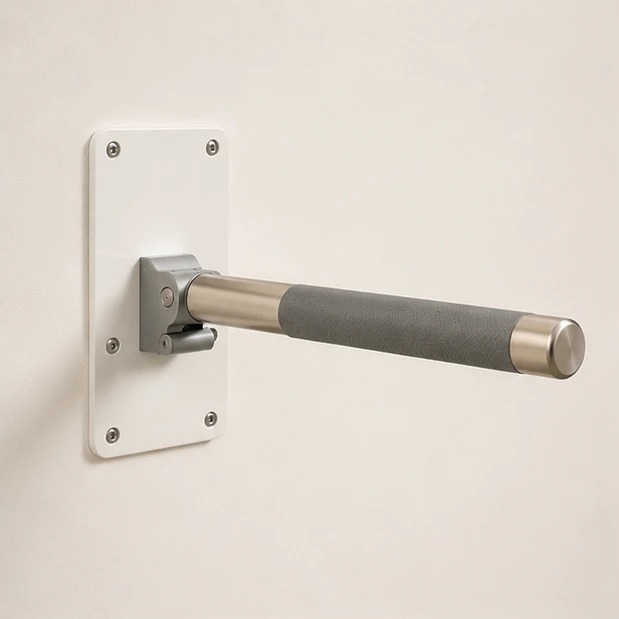
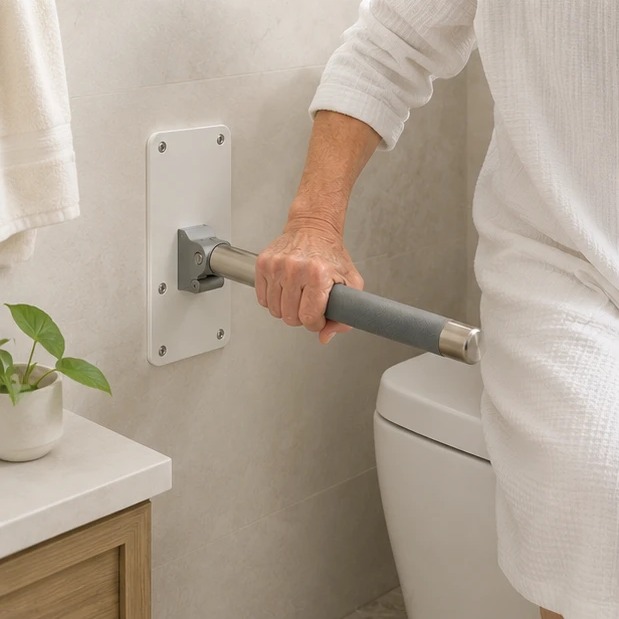
Keep the same: the white rectangular mounting plate with screws in the corners, the brushed steel pivot at the base, the dark grey textured grip in the middle, and the rounded brushed-steel end cap. The bar should be the length of a forearm. You can change: the room, the wall color, the light, the person, and what is around it.
Very important about the toilet: When the bar is in a bathroom with a toilet, mount it on the wall BEHIND the toilet (the wall the tank backs against, above the tank). Never beside the toilet. The person sitting on the toilet should be able to reach back to grip it.
The look must be a premium, calm, real home. A beautiful bathroom, bedroom, or living room. Never a hospital. Never a clinic. Never a care facility. If a person is in the picture, they should be a dignified, healthy adult age 70 to 85. Real seniors, never sad, never frail.
1
Make the photos in ChatGPT
- Save the two pictures above to your computer.
- Open ChatGPT and upload both pictures.
- Paste the text below. Change the last line using an idea from Step 2.
- If it looks right, save it. If not, ask ChatGPT to try again.
This is the Rise Bar product (see the pictures).
It is a wall-mounted grab bar that helps an older adult rise from a toilet, chair, or bed.
The bar swings on a pivot: folds up flat to stow, swings down horizontal to use.
Make a new, real photo of this exact product.
Keep the white mounting plate with corner screws, the brushed steel pivot, the dark grey textured grip in the middle, and the rounded steel end cap. Bar is the length of a forearm.
The setting is a premium, calm, real home. Warm soft light. Never a hospital or clinic.
If a person is in the photo, they are a healthy dignified senior aged 70 to 85.
If the scene is a bathroom with a toilet, the bar is mounted on the wall BEHIND the toilet (above the tank), never on the side wall.
Now make this: mounted on the back wall behind a beautiful modern toilet, soft morning light, a small plant on the counter.
2
Pick any ideas you like
Aim for about 40 good images total. For now, do more product-focused close-ups and less lifestyle until we lock the product look.
Product alone (clean background)
- studio shot on warm neutral wall
- close-up of the grey textured grip
- close-up of the brushed steel end cap
- close-up of the pivot bracket
- side view of the swing motion
- stowed flat against the wall
What's in the package
- overhead flat-lay showing every part
- the bar, mounting plate, screws, and a diamond drill bit
- the diamond bit is included so install does not crack tile
In a beautiful bathroom
- mounted on the wall BEHIND a modern toilet (above tank)
- warm tile, soft morning light, plant nearby
- stowed flat behind toilet to show space saving
- close-up of bar on back wall above tank
In a bedroom or living room
- mounted beside a bed with white linens
- beside a soft reading chair in a warm room
- in a calm hallway, warm wood floor
An older senior 70 to 85 using it
- reaching back to grip the bar while standing from toilet
- hand wrapped around the grey grip, mid-rise
- healthy dignified senior, never sad, never frail
- NEVER hospital, NEVER clinic, NEVER care facility
Square (for Instagram)
- product centered, calm wall
- hand on grip, close-up
- stowed flat, soft light
- back-wall mount above the toilet, square crop
3
Send them to Sergio
- Put all the images in a Google Drive folder. Name it Rise Bar Images.
- Get the share link for that folder.
- Email the link to Sergio.
sergio@ameriasiaworks.com
Subject:
Rise Bar Images
That is it. One email with the Google Drive link. Done.
Size: make images large and clear. Wide shape for most, square for the Instagram ones. • Names: just call them risebar-01, risebar-02, and so on.